Savanna
with Savanna NightGolden grass under an acacia tree, with a moon and stars in Savanna Night.
A pixel-art watch face for Garmin
Choose from 20 zoo animals and three habitats, then add the stats you want to see when you check the time.
Choose your animalIn private beta. Not yet publicly available.
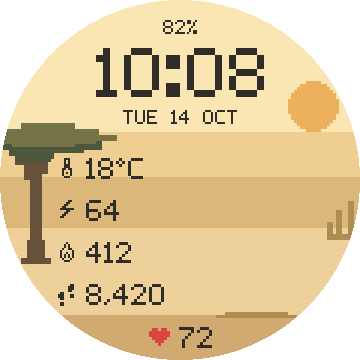


Lion · Savanna · Sample readings
Twenty zoo animals. Tap one to try it in the watch preview.
Missing an animal? Send me a request.
Savanna, Jungle, and Arctic each have a day and night version. Your animal stays the same when you switch.
Golden grass under an acacia tree, with a moon and stars in Savanna Night.
Leaves and hanging vines, with fireflies in Jungle Night.
Snow and ice floes, with a moon and aurora in Arctic Night.
On a touchscreen watch, touch and hold your animal to switch between day and night. Or change it in Connect IQ settings.
Time, date, battery, and heart rate appear when your watch is awake. Choose what the other four rows show, or leave them empty.
PixelZoo is built for supported round AMOLED Garmin watches, including models in the Forerunner, Venu, epix, fēnix, and vívoactive families. MIP-display watches aren’t supported. Send me your model if you’re not sure.
After installation, open PixelZoo in the Connect IQ app and go to Settings. Choose your animal, habitat, day or night, and the stats for your four configurable rows. On touchscreen watches, touch and hold the animal to switch between day and night in your chosen habitat.
PixelZoo keeps the full face rather than switching to a clock-only layout. Garmin controls screen timeout and wrist-gesture activation. Keep Always On Display off; this full-color design is not intended for always-on use.
PixelZoo uses data available from your Garmin. Temperature follows your watch’s °C/°F setting; distance follows km/miles, without a unit label on the face. Missing readings show a dash. Weather may need a phone sync to refresh.
Choose total daily calories or estimated active calories in settings. The active estimate uses profile information to subtract estimated resting burn; if that information is missing, the face shows total calories. These are everyday reference readings, not medical advice.
Your health and activity readings are processed on your watch, not sent to danyzmaj. PixelZoo has no analytics or separate account. Estimated active calories also use profile information locally.
The website adds no analytics or cookies, but its host processes connection data, and support emails contain information you choose to send. Read the privacy policy.
PixelZoo is in private beta and is not yet publicly available. A Garmin Connect IQ store link will appear here when it launches.
For now, try the animals and habitats on this page. Questions? Get in touch.
I’m Danijel, the developer behind PixelZoo. Email me with the animal you want to see next. You can use the same address for help with the watch face.